
Verifying this is the official Rollino Bet website…
Rollino Casino Registration for New Accounts
Creating an account at Rollino UK takes under 60 seconds and is fully open to UK players aged 18+. You can register from a computer or phone — no paperwork, no unnecessary steps. Once your account is set up, check the terms and conditions for your welcome bonus to understand the wagering requirements and make the most of what’s on offer.
1
Visit the official Rollino Casino
Visit the official site or open the app and click the “Sign Up” button in the top-right corner.
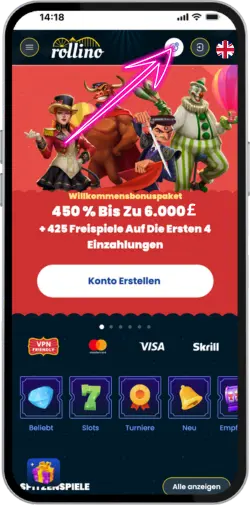
2
Entering personal data
Enter your valid email address (Gmail, Outlook, or any other email address—delivery is instant). Create a strong password. Select GBP as your account currency (default for UK users). Check that you are over 18 and accept the Terms of Service. Click “Register.”
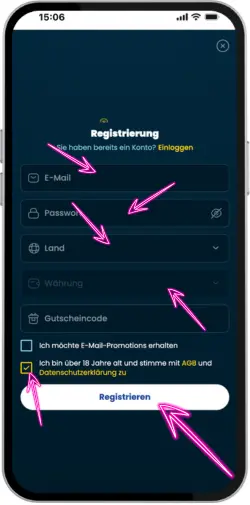
3
User confirmation
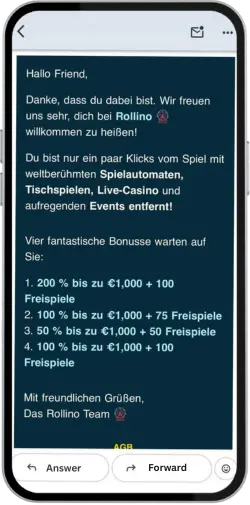
Check your email for a confirmation link. Click it to activate your account and instantly receive 50 free spins with no deposit required.
Requirements and Basic UK Login Rules
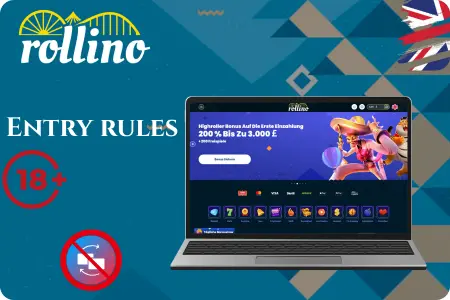
Rollino Casino UK login is fully licensed and open to all players over 18. The platform runs without restrictions for UK users, in line with all UKGC regulations and UK law. Any rule violation will result in account cancellation and complete loss of all funds on the balance.
- One account per person is allowed, and duplicate accounts are not permitted.
- Always use the official website or app, for Rollino login.
- No ID is required for your first sign in. Verification is only needed before your first withdrawal.
- A VPN is neither required nor permitted. Access works smoothly from anywhere in the UK.
- Responsible gaming tools are activated immediately after registration and your first sign in.
Secure Ways to Log In on the Website and App
Logging into your Rollino Casino account is straightforward and completely secure, whether from a laptop or with a single tap on your phone. Our platform maintains a high level of security, so your data stays protected at all times.
| Login Method | How to Do It Safely | Extra Protection |
| Website | Always type rollinobet.uk.com directly or use a bookmark. Never click links from emails/chats. Check for the green padlock and “https://”. | 256-bit SSL encryption Auto-logout after 15 min of inactivity |
| Mobile App | Download only from our website official App Store. Verify the publisher before installing. | Biometrics (Face ID / Touch ID) Full SSL encryption No third-party stores |
| Password | Use at least 12 characters + numbers + special symbols. Never reuse across sites. | Store in a password manager (Bitwarden, 1Password, etc.) |
| Two-Factor Authentication (2FA) | After login, go to Profile → Security and enable Google Authenticator. | Even if password is stolen — login impossible without one-time code |
| Public Wi-Fi | Avoid logging in at cafés, malls, airports. If you must — use a VPN. | Mobile data (4G/5G) is always safer |
| Someone else’s device | Never log in on work or strangers’ devices. If forced — use incognito mode and log out immediately. | Always click “Log Out” after the session |
For extra peace of mind, turn on 2FA in your settings — it takes just 10 seconds and makes your account far harder to breach. Every login stays safe, no matter where you're playing from.
The main safety rule is simple: use only the official website or the app from trusted sources. Avoid third-party links, mirrors, and “alternative” APK files, as they are one of the easiest ways to lose access to your account and funds. Follow these basic rules, and your account will stay protected.
Rollino Casino Login Steps via Email
The most reliable way to log in is with the email address you used during registration. The process is straightforward and fully secure, working the same way on desktop and mobile.
1
Visit the official Rollino Casino
Visit the official site or open the app and click the “Sign Up” button in the top-right corner.
2
Entering personal data
Enter your valid email address (Gmail, Outlook, or any other email address—delivery is instant). Create a strong password. Select GBP as your account currency (default for UK users). Check that you are over 18 and accept the Terms of Service. Click "Register."
3
User confirmation
Check your email for a confirmation link. Click it to activate your account and instantly receive 50 free spins with no deposit required.
Two-Step Verification Methods
Protect your Rollino account by enabling two-factor authentication (2FA). Even if someone obtains your password, they won't get in without a unique one-time code that only you can generate — access is blocked at that point. Setup takes under 60 seconds and adds a strong extra layer of protection for your money, bonuses, and personal data.
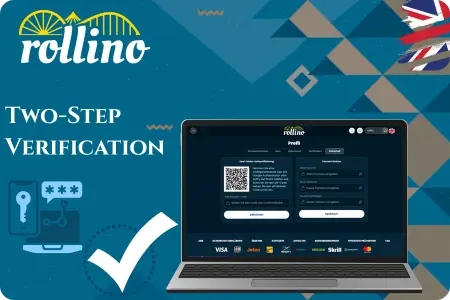
- After completing your Rollino Casino login, click your profile icon in the upper right corner.
- Go to the “Security” tab in your settings menu and open it.
- Scroll to “Two-Factor Authentication” and click “Enable.”
- Select Google Authenticator and scan the QR code using the app on your phone.
- Enter the 6-digit code generated by the app to confirm setup.
- Save the backup codes that appear (they will also be emailed to you)—keep them safe in case you lose your phone.
Troubleshooting Common Login Errors
At Rollino Casino, 99% of login issues are resolved in under 30 seconds. Below is a quick look at the most common problems UK players run into, along with the simplest fixes to get you back in quickly.
| Problem | Solution |
| “Incorrect email or password” | Double-check Caps Lock and keyboard layout. Click “Forgot password?” – we’ll send a reset link instantly. |
| “Account blocked / locked” | Too many wrong attempts? Just wait 5–10 minutes or drop a message in live chat — we'll get you back in within seconds. |
| Page won’t load | Clear browser cache (Ctrl+Shift+Delete) or try another browser/app – works every time. |
| “Please confirm your email first” | Check inbox + Spam/Junk and click the verification link we sent during Rollino registration. |
| 2FA code not arriving | Set your phone time to automatic, or choose “Send SMS instead”. |
| Password-reset email never arrives | Add our support email to your safe senders list and check your Promotions or Spam folders. |
Payments and Account Access After Login
Deposits become available instantly after logging in, with no extra steps or waiting. When making a deposit, simply choose your preferred payment method.
| Payment Method | Details |
| Visa / Mastercard | £10 min |
| Apple Pay / Google Pay | £10 min |
| PayPal | £20 min |
| Skrill / Neteller | £10 min |
| Crypto (BTC, ETH, USDT, LTC…) | £20 min |
We are a fully licensed, secure platform using 256-bit encryption — the same standard as the UK's largest banks. Thousands of players across England, Scotland, and Wales withdraw funds daily without any trouble: e-wallet and cryptocurrency withdrawals typically arrive within 30 seconds to 10 minutes, while card withdrawals take anywhere from 20 minutes to one banking day. Your first withdrawal requires passport verification, which usually takes between 1 minute and 24 hours — all subsequent withdrawals are processed straight away. Fund your account, play, and withdraw whenever you like: fast, straightforward, and 100% secure.